Run an LLM on a phone.
Each colour is one token: this is how a model reads the sentence.
A hands-on course for Android and iOS developers who are new to machine learning. Learn how language models work, fine-tune a small one on your Mac, and ship it inside a real app.
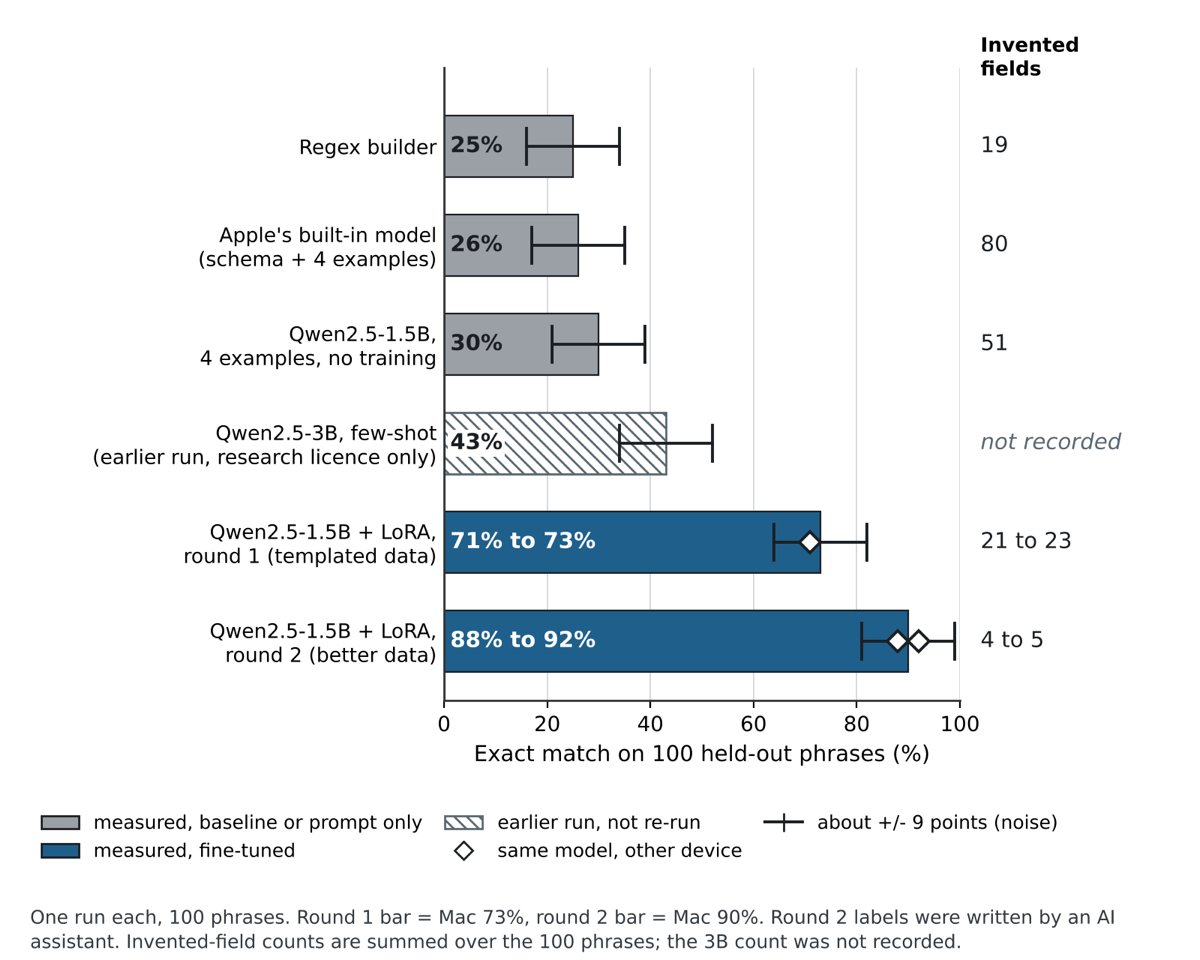
The same 1.5-billion-parameter model, before and after fine-tuning, on 100 test phrases it never saw in training.
Qwen2.5-1.5B, exact match on every field. You build this model in the course.Measured, not promised
Every number in the course comes from a run you can repeat. The chart compares a regex parser, Apple's built-in model, prompting alone, and two rounds of fine-tuning.
How every lesson works
- GoalOne thing you will be able to do by the end of the lesson.
- Try itA live demo in the page, or a command to run on your own Mac or phone.
- CheckShort questions with instant answers and the reason behind each one.
- RecapThree or four lines to keep, and what comes next.
The lessons
46 lessons, about 8 hours of reading and doing. Lessons 1 to 10 are free.
Part 0. Start here
- 1. WelcomeSay what the course builds, what the real results were and how far to trust them, and see the whole journey in ten steps.12 min · free
- 2. Set up your MacInstall and check the tools the course needs, and know how to fix the common setup problems.10 min · free
Part 1. How language models work
- 3. What a language model isExplain a language model in one sentence, and say why every app feature built on one is a loop.6 min · free
- 4. TokensSay what a token is, see how text is cut into tokens, and explain why token count matters more than character count.12 min · free
- 5. Sampling and temperatureUnderstand how the next token is picked, and choose a temperature for each feature in your app.12 min · free
- 6. The context windowExplain the context window, run a model on your Mac, and see what happens when your text does not fit.14 min · free
- 7. Weights and trainingDescribe what is inside a model in one paragraph, and explain why training changes weights but running a model does not.8 min · free
- 8. QuantizationEstimate the size of a model at different bit widths, and say why quantization lets a phone run it.9 min · free
- 9. Small models need helpSay why phone-sized models need help on narrow tasks, compare a 1B and a 3B model yourself, and name the two kinds of help.12 min · free
- 10. EvaluationExplain why you need a held-out test set, read a score table, and know what a score does not tell you.12 min · free
Part 2. Fine-tune a small model
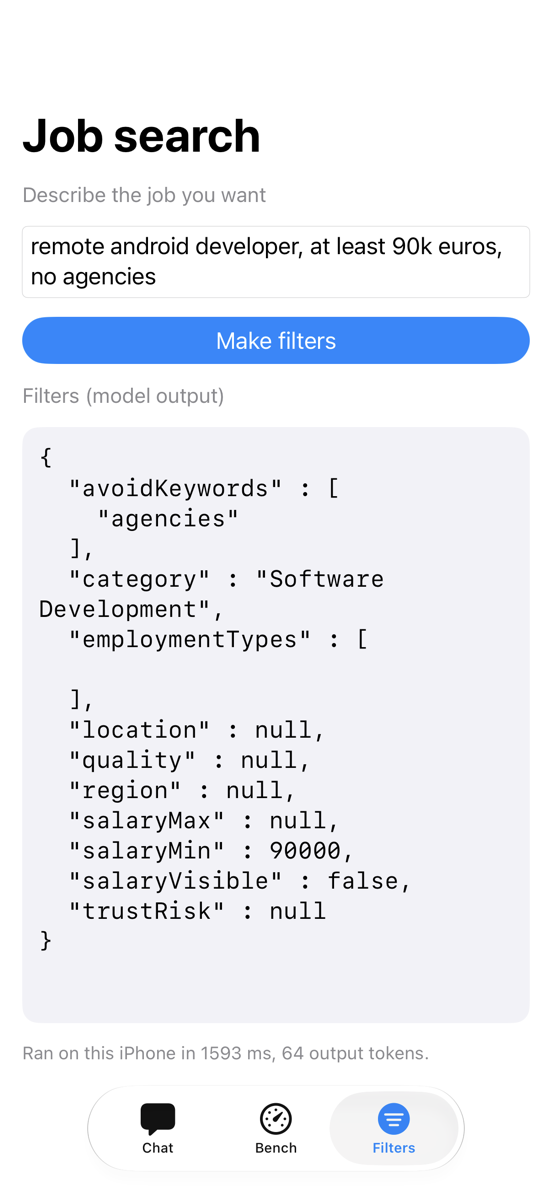
- 11. The task - from a sentence to filtersDescribe the 10-field filter schema, and say why turning a sentence into those fields is hard for a small model.8 min
- 12. Prompting is not enoughMeasure what a long prompt and four examples can do for a small model, and see why that falls short.9 min
- 13. Fine-tuning and LoRAExplain fine-tuning, LoRA and an adapter in plain words, and say why our result is a 20 MB file.10 min
- 14. Training data and the held-out ruleWrite one training example in the right format, and keep a test set the model never sees.10 min
- 15. Round 1 - data from templatesExplain how a script makes labeled training data from templates, and what that approach cannot teach.8 min
- 16. Round 2 - 3,000 varied phrasesExplain how the round-2 data was written, what the label rules are, and how a script validates and de-duplicates it.12 min
- 17. Train the adapterSet up a Python environment, run the LoRA training command, and read what it prints.12 min
- 18. Evaluate and fuseScore an adapter with eval.py, fuse it into one model folder, and score the fused model again.12 min
- 19. Read the resultsRead a loss curve and a score table, and say what round 2 changed on the Mac and on the phones.15 min
- 20. What still goes wrongName the kinds of mistakes the fine-tuned models still make, and the limits of the numbers in this part.12 min
Part 3. Run it on Android
- 21. The on-device stackName the three pieces of an on-device model setup (file, runtime, backend) and say which one a given error comes from.8 min
- 22. First model on the phoneGet a model file that needs no login, push it with adb, and run the LocalLlm starter app on a real phone.12 min
- 23. Read the Android codeRead the LocalLlm code and explain the engine, the conversation, the streaming Flow and the lifecycle rules for a model that holds over a gigabyte of memory.12 min
- 24. Benchmark on the PixelRun BenchActivity from the command line, survive process kills with runphone.sh, and read the speed, memory, heat and quality numbers we measured on a Pixel 6.14 min
- 25. Reliable JSONParse model output safely with one retry, and decide between a short and a long system prompt using measured numbers.12 min
- 26. Convert to LiteRT-LMTurn a fine-tuned MLX model into a .litertlm file, know which routes failed and why, and read what the round-2 models did on the Pixel 6.14 min
- 27. Android emulator with llama.cppRun the round-2 models in an Android emulator with llama.cpp when you have no phone, and say what that experiment does and does not prove.14 min
Part 4. Run it on iOS
- 28. Apple's built-in modelCheck whether Apple's on-device model is available, call it with a session, and control its length and randomness.12 min
- 29. Typed output, tools and errorsGet Swift values from the model with @Generable, let it call your code with a Tool, and handle its failures.11 min
- 30. The FmLab test appRead the FmLab source and know what each file and function does, so you can change the benchmark for your own task.13 min
- 31. Build, sign and installGenerate the Xcode project, build FmLab for a device, install it, launch a benchmark and copy the results back, all from the terminal.13 min
- 32. Apple's model: what we measuredRead the measured results of Apple's on-device model on the 100-phrase test and judge when it is worth using.7 min
- 33. MLX Swift on the iPhoneRun the fine-tuned Qwen model on an iPhone with MLX Swift and compare it with Apple's model and with the regex builder.15 min
- 34. Which iOS route to chooseDescribe the three iOS routes (Foundation Models, MLX Swift, Apple adapters) and pick one for your feature.8 min
Part 5. Decide and ship
- 35. The whole story, on the MacFollow every Mac result of the course in order, from the regex baseline to round 2 of fine-tuning.12 min
- 36. On the phones, and the master tableRead the phone results for every setup, and find any option in one master table.10 min
- 37. How to decideApply one rule to pick the model option for your own feature, and read our recommendation.8 min
- 38. Shipping checklistRun a release checklist for an app that downloads and runs a model on the device.8 min
- 39. What we did not measureName the gaps in our results, so you do not trust a number we never produced.7 min
Part 6. Case study 2: quick-add on Android
- 40. The quick-add taskDescribe the quick-add feature, see where a rules parser falls short, and learn the design rule that keeps a model safe.12 min
- 41. Quick-add data and test setsSee how the project built training data, kept the test sets clean, and chose the statistics to report.13 min
- 42. Quick-add training runsRead the LoRA settings, follow nine training runs, and learn why one run is not a result.14 min
- 43. Quick-add checker and limitsSee how a code checker, a bigger model, other languages and a baseline each changed the decision.14 min
- 44. Quick-add on AndroidSee what runs in the app today, what the converted LLM measured on an emulator, and what this project teaches next to the first one.15 min
Reference
Early access: what is still open
Every number comes from one run on 100 test phrases, with about 9 points of noise. Language models wrote the round-2 training labels, and a person has not checked all of them yet. The kit for that check ships with the code. Battery drain was measured once, on the iPhone only, and the figure is rough. Early-access buyers get every update for free.