Lesson 6 · Part 1. How language models work · 14 min
The context window
Goal. Explain the context window, run a model on your Mac, and see what happens when your text does not fit.
What it is
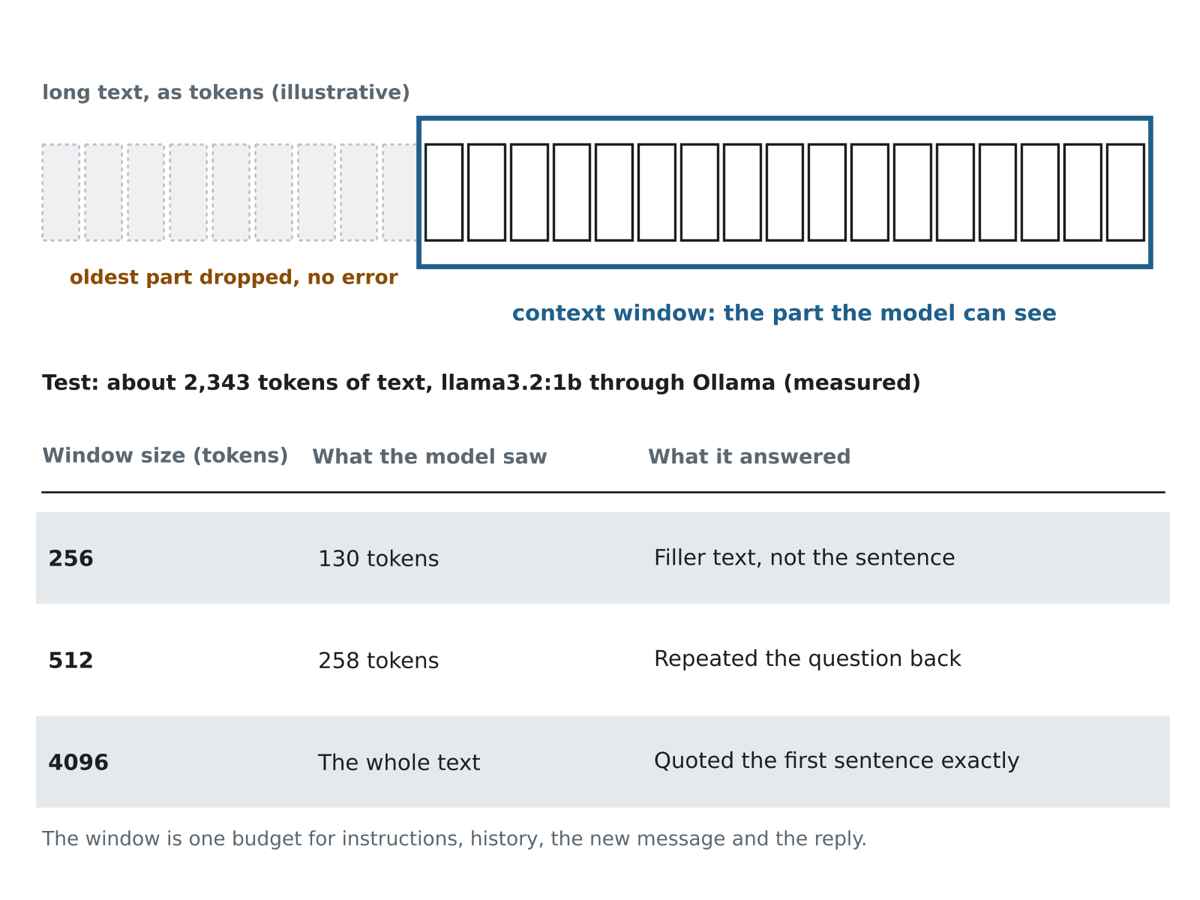
The model only sees what you send in each request. It has no memory between requests. There is also a limit on how much it can see at once. This limit is the context window. It is counted in tokens. Common sizes are 4,096 or 32,768 tokens.
The prompt and the answer share the window. If the window is 4,096 tokens and your prompt has 4,000 tokens, only 96 tokens remain for the answer.
Why it matters for an app
Chat "memory" is not inside the model. Your app stores the conversation and sends the whole conversation again in every request. A longer history has three costs.
- The reply starts later, because the model must read more tokens first.
- The app uses more RAM. The model keeps stored attention results for every token in the context. This store is the kv cache. It grows with the context length.
- At some point the history no longer fits. Then the app must trim old messages or summarise them.
What happens if you send too much? The model may fail in a strange way, and it does not always show an error. Experiment 4 below shows this on a real model.
Do it: experiment 2, run a model on your Mac
ollama runs models on your Mac. The first command downloads a small model and starts a chat. If you have not installed it, see lesson 2.
ollama run llama3.2:1b
You will see a >>> prompt. Ask these three questions, one at a time.
What is the capital of Australia?
What is 17 * 23?
Name the three primary colors of light.
What we measured: on our Mac the answers were correct: Canberra, 391, and red, green and blue. Watch how the text streams in. That is the token loop from lesson 3.
Type /bye to leave the chat.
Tip To see speed numbers yourself, run
ollama run llama3.2:1b --verbose. After each answer it prints timing details, including the evaluation rate in tokens per second.
Do it: experiment 4, hit the context limit
This is experiment 4 of the five. It belongs here because it tests the context window. Experiment 3, temperature, was lesson 5.
We prepared a text of about 1,695 words. Its true first sentence is:
The lighthouse keeper of Marrowgate, Odalys Venn, never once lit the lamp on a Tuesday.
We pasted the text into the model and asked it to quote the very first sentence exactly. We did this three times, each time with a different context size. In Ollama this setting is called num_ctx.
To repeat this, start the chat and set the context size:
/set parameter num_ctx 512
Then paste a long text and ask: "Quote the very first sentence of the text above, exactly." Change the number and ask again. Use any long text you like. Ours was a made-up story, so the model could not know it from training.
What we measured
| num_ctx | Prompt tokens the model saw | Answer |
|---|---|---|
| 256 | 130 | "345 boats and 805 gulls near the pier." |
| 512 | 258 | "Question: Quote the very first sentence of the text above, exactly." |
| 4096 | 2343 | "The lighthouse keeper of Marrowgate, Odalys Venn, never once lit the lamp on a Tuesday." |
The table shows what happens when the window is too small. Ollama cut the start of the prompt. With 256 as the limit, the model saw only the last 130 tokens. It quoted a sentence from the end of the text, which is wrong. With 512 it saw 258 tokens and quoted the question itself. Only with 4,096 did the first sentence fit, and only then was the answer right.
Notice two things. The text was about 1,695 words, but the model saw 2,343 tokens, so one word is more than one token here. And the wrong answers look confident. The model gave no error. It answered from what it could see.
Warning A model that cannot see part of your prompt does not tell you. It writes a fluent, wrong answer. In an app, always count tokens before you send a request, and keep a safe margin.
For our project this matters. Our system prompt is long (about 450 tokens). It must always fit in the window, together with the user's sentence and the JSON answer.
Common problems
| Symptom | Cause | Fix |
|---|---|---|
ollama run starts a very slow download |
The model file is large (about 1 GB or more) | Wait for it to finish. It downloads once and is then stored on the Mac. |
/set parameter is not accepted |
You typed it in the shell, outside the chat | Run ollama run llama3.2:1b first, then type the command at the >>> prompt. |
| The model quotes the wrong sentence in experiment 4 | The context is too small and the start of the text was cut | Raise num_ctx. Keep the total prompt well below the limit. |
Check yourself
In experiment 4 the model gave a wrong answer with no error when num_ctx was 256. What happened?
The window was too small. The start was cut, and the model answered from what was left.
A chat app has a 4,096-token window. The history has 4,000 tokens. How much room is left for the reply?
Prompt and answer share the window.
Where does a chat app's "memory" live?
The model keeps nothing between requests. The app stores the history.
Recap
- The context window is the token limit for one request. Prompt and answer share it.
- Chat memory lives in your app. A longer history means a later first token and more RAM.
- Text that does not fit is cut with no error, and the answer is fluent and wrong. Count tokens first.
- Next lesson: what is inside the model, and the difference between training and running.