Lesson 1 · Part 0. Start here · 12 min
Welcome
Goal. Say what the course builds, what the real results were and how far to trust them, and see the whole journey in ten steps.
You will build one feature and measure it. The user types a sentence. The app turns it into search filters. Everything runs on the phone, with no server and no network.
What you will build
The user types this:
remote android developer, at least 90k euros, no agencies
The app must turn it into filters. This is the real answer of the model you build, on an iPhone 17, with the fields it left empty removed:
{
  "avoidKeywords": ["agencies"],
  "category": "Software Development",
  "salaryMin": 90000
}
It took 1.6 seconds on the phone. "Remote" is not a filter, because every job in this app is remote. The full filter format has ten fields, and you will meet it in lesson 11.
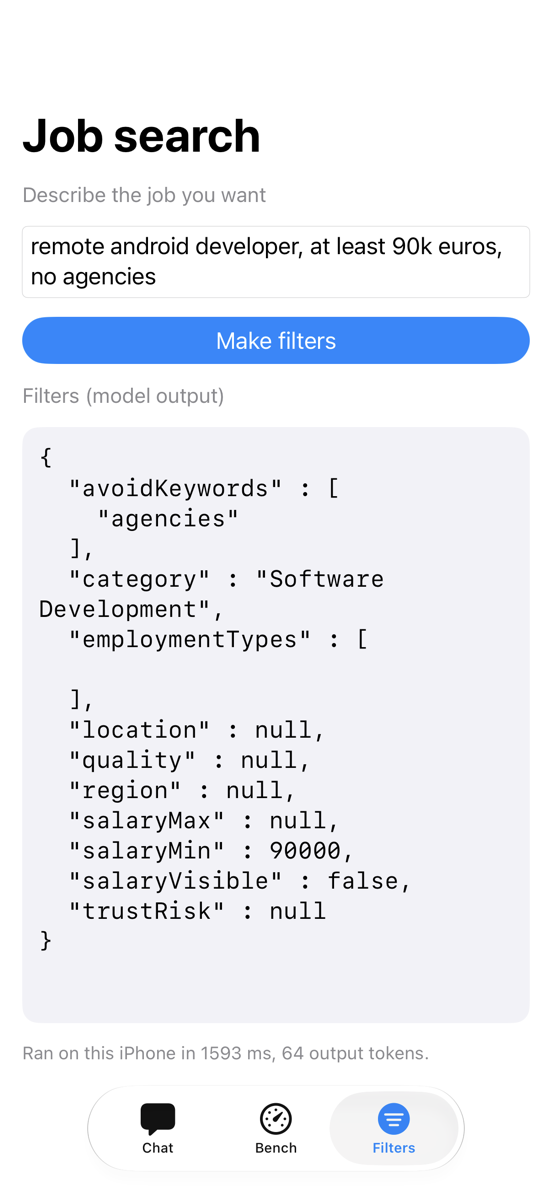
The sentence may be English, Spanish, German, French or Portuguese. It may have typos. It may say what the user does not want ("no agencies", "not full-time"). The output must be valid json that the app reads with no extra code.
This is a good first project for a language model, for four reasons.
- The task is narrow. The model does one job. Small models can do one narrow job well.
- You can measure it. Every answer is right or wrong. You can count.
- It needs privacy. A job search is personal. On the device, the text never leaves the phone.
- Old code fails at it. The usual solution is a regular-expression ("regex") builder. In our test it got 25% of 100 phrases right.
The real results
We ran this project ourselves. The table shows what we measured. "Exact match" means the model got every field of the filter right. One wrong field fails the phrase, so it is a strict score.
| Approach | Exact match, 100 test phrases |
|---|---|
| Regex builder in the app | 25% |
| Apple's built-in on-device model, with examples in the prompt (iPhone 17) | 26% |
| Qwen2.5-1.5B, no training, no examples in the prompt (Mac) | 3% |
| Qwen2.5-1.5B, no training, 4 examples in the prompt (Mac) | 30% |
| Qwen2.5-1.5B after fine-tuning, round 1 (Mac) | 73% |
| Qwen2.5-1.5B after fine-tuning, round 2 (Mac) | 90% |
| The same round-2 model on an iPhone 17 | 88% |
| The same round-2 model on a Pixel 6 (LiteRT-LM) | 90% |
| The same round-2 model in an Android emulator (llama.cpp) | 91% |
| Qwen2.5-0.5B after fine-tuning, round 2, a 276 MB model (Mac) | 76% |
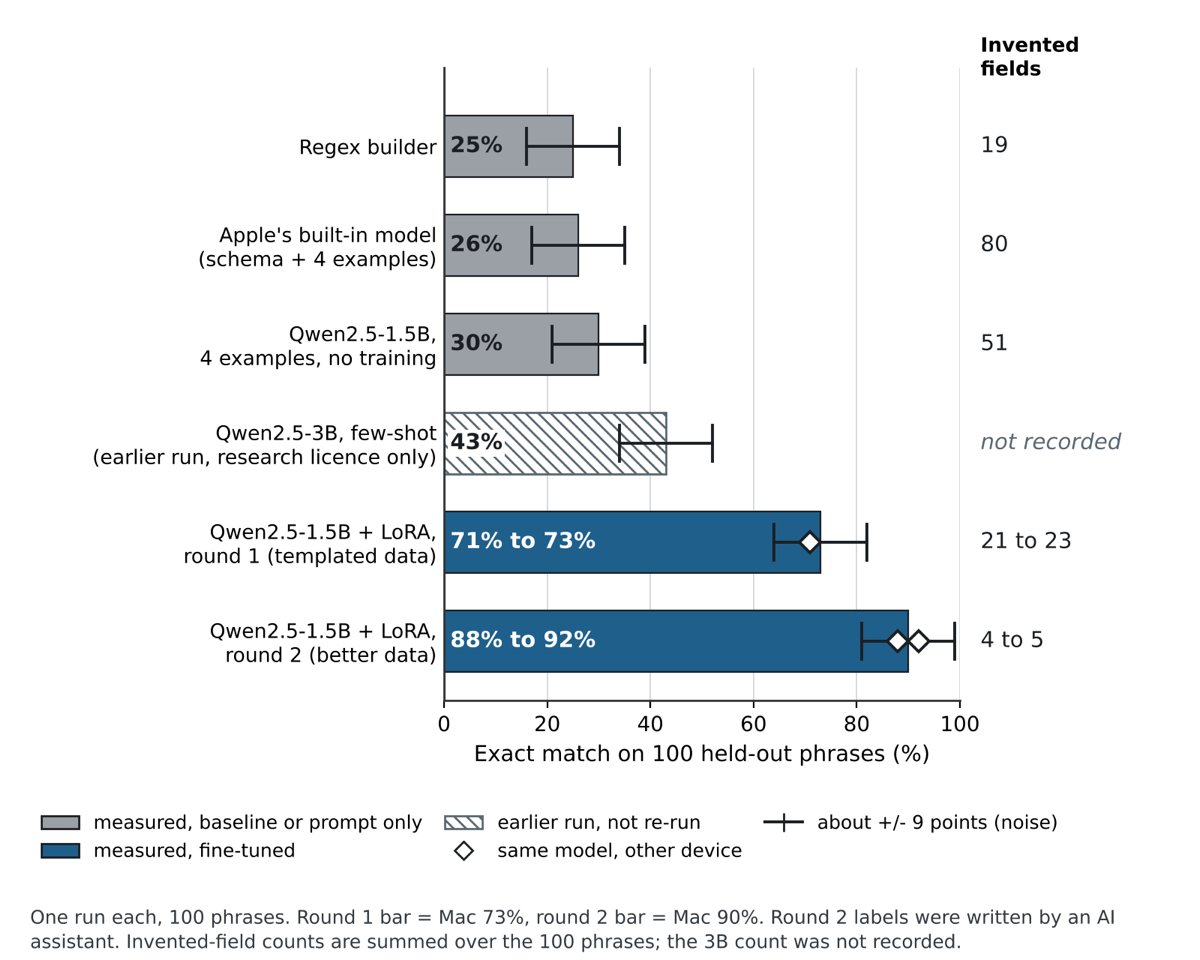
The headline: the same 1.5-billion-parameter model went from 3% with no help to 90% after we trained it on our own task. The step from 3% to 30% is prompting. The step from 30% to 90% is training. You will learn both, and what "fine-tuning" and "round 2" mean, in Part 2.
The round-2 model also ran on real phones: 88% on an iPhone 17 and 90% on a Pixel 6, close to the Mac. On the Pixel it is accurate but slow, about 11 s per phrase with the long prompt. The emulator used a different runtime (llama.cpp) and shows accuracy only, not phone speed.
What the results do not show
Read these limits before you trust any number in this course.
- One run each. Every score comes from one run. On 100 phrases, about 9 points of noise is normal. A gap of a few points means nothing.
- The authors wrote the test phrases. One person wrote the 100 test phrases. They may be easier or harder than what real users type. We also wrote a second set of 40 messy phrases by hand, as a check.
- Some labels were not reviewed. In round 2, language models wrote the training labels, and a human did not check all of them.
- One task. This is one project with one narrow task. The results say little about other tasks.
Note Each lesson says what we did not measure. Lesson 39 collects them in one place.
The journey in ten steps
Read the list once. Each line is one step, and each step has its own lessons.
- Understand the idea. A model reads tokens and predicts the next one. Everything else builds on this (Part 1).
- Try a model on your Mac. Run a small model with ollama. Watch tokens, temperature and the context limit (Part 1).
- Run a model on Android. Put a model file on a real phone. Measure speed and memory (Part 3).
- Improve it with prompts. Write a system prompt. Ask for JSON. Measure again.
- See where prompts stop. The untrained 1.5B model scored 3% with no examples and 30% with four (Mac). On the Pixel 6, the unmodified 8-bit build scored 1% with no examples. That is not good enough.
- Build a dataset. Write thousands of example sentences, each with the correct filters (Part 2).
- Fine-tune on your Mac. Train a small add-on. Test it on phrases the model has never seen (Part 2).
- Run the result on iOS. Run the fine-tuned model on an iPhone. Compare it with Apple's built-in model (Part 4).
- Improve with round 2. Write 3,000 more varied training phrases. Train again. Measure again.
- Ship it. Check size, speed, heat and the cases where the model is wrong. Decide what the app does when the model fails (Part 5).
Every step produces a number. That is on purpose. With language models, a feeling that "it works" is not enough. You need a score.
How long it takes
Our first plan was 6 to 8 weeks at 5 to 6 hours a week, about 30 to 50 hours in total. These are estimates, not measurements.
| Part | Rough time |
|---|---|
| How language models work, with Ollama experiments | 1 week |
| Android: run a model and make it good | 2 weeks |
| Fine-tuning: ideas, then training on the Mac | 1.5 weeks |
| iOS: Apple's model and your own model | 2 weeks |
| Round 2 and shipping | 1 week |
Training itself is short. One 1.5B training run took about 23 minutes on our Mac. Most of the time goes to reading, writing data and measuring.
Tip Do the steps. Reading alone will not give you a feel for how these models behave. Keep a plain notes file and write down every result.
Check yourself
What does the course feature take in, and what does it produce?
The app turns a sentence like "remote android developer, no agencies" into filters it can parse.
The fine-tuned 1.5B model scored 90% on the Mac. How should you read that number?
The score is one run on 100 phrases written by the authors. Small gaps are within noise.
Why is exact match a strict score?
Every field must be correct for a phrase to count.
Recap
- You build one on-device feature: a sentence in, JSON search filters out.
- Measured on 100 phrases: the same 1.5B model went from 3% untrained to 90% after round 2 (Mac), and scored 88% on an iPhone 17.
- Treat the numbers as one run each, about 9 points of noise, with test phrases written by the authors.
- Next lesson: set up your Mac and check that the tools work.